After changing a DNS record (see the "Managing Your DNS Records" guide), SkyDNS Manager offers two built-in tools to check whether the change is actually visible on the internet yet - no need to wait and check manually with external tools.
Why DNS changes don't take effect immediately
DNS changes aren't visible everywhere on the internet right away - other DNS servers around the world keep their own copy of your old data and only refresh it once the previous record's TTL expires (see "Managing Your DNS Records" for an explanation of TTL). So a change can take anywhere from a few minutes to 24-48 hours to "travel," depending on where the person accessing your website/email is located and which DNS server they use.
Checking your nameservers
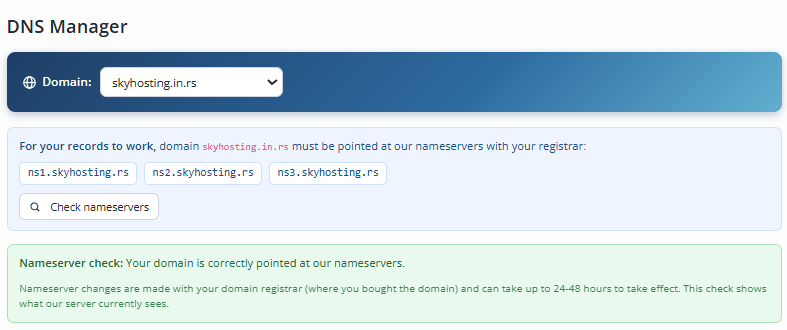
The "Check nameservers" button (next to the list of our nameservers at the top of the page) checks whether your domain is actually pointed at our servers with your registrar. The result is one of the following:
- Correctly pointed (green message) - everything is fine. If one of the three nameservers is missing, it still works, but we recommend adding it too for extra resilience.
- Not pointed at our servers (amber message) - your domain is pointed at different nameservers with your registrar. The records you set up here will NOT be used until you fix this with your registrar.
- No data found (amber message) - the domain may be newly registered, expired, or the registrar-side change is still propagating.
Checking an individual record
The "Check" button next to each record in the table compares the value you set to what public DNS currently returns. Results:
- Record is live (green message) - public DNS returns exactly that value.
- Different value (amber message) - public DNS currently returns something else; the change may still be propagating, or the nameservers aren't pointed correctly (check the tool above).
- Nothing yet (amber message) - same possible reasons as above.
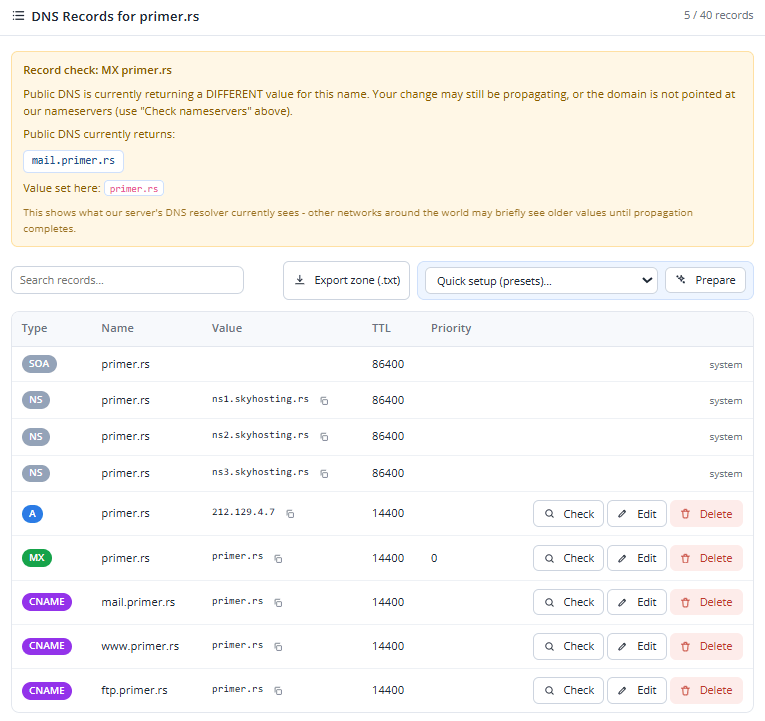
Important note: both checks show what our server currently sees, not the state of the entire internet at once - other networks around the world may briefly see older values until the change has fully propagated.
If checks still show the old value or the nameservers still aren't pointed correctly after 48 hours, see the "FAQ & Troubleshooting" guide or contact support.